Three Free Online Image Tools Every Creator Should Bookmark

更新 發佈閱讀 8 分鐘

Finding the right tool for a single, simple edit can save hours in a busy workflow. Below are three lightweight web apps—each focused on one common task—that you can use without installing software or creating an account. Whether you need to invert colors, crop perfect circles, or strip a photo down to timeless black‑and‑white, these sites have you covered.


1. Instant Color Negatives with Image Inverter
raw-image


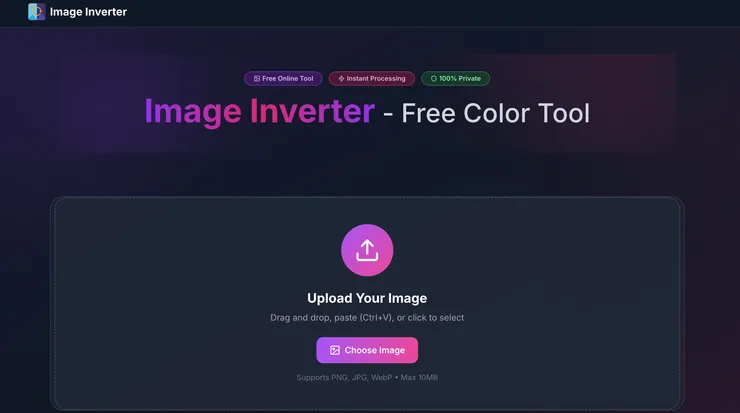
Need a quick “photo‑negative” effect or want to check highlight detail by inverting colors? Image Inverter lets you drop in a PNG, JPG, or WebP (up to 10 MB) and download the flipped version in seconds. All processing happens inside your browser, so your files never leave your device—great for privacy‑sensitive projects. The menu also links out to sister utilities like Flip, Darken, and Lighten, giving you a mini toolbox in one page.

Why you’ll like it

  • Zero‑install, zero‑watermark: perfect for one‑off edits or batch workflows.
  • Full‑resolution output: no compression or quality loss.
  • Side benefits: Negative previews help photographers judge exposure and composition.

2. Pixel‑Perfect Avatars via Circle Crop Image

raw-image


Profile pictures, team pages, and social icons all look cleaner when they share a uniform shape. Circle Crop Image specializes in turning any rectangular photo into a crisp circle. Upload, drag the on‑screen slider to set diameter, reposition the crop, then export as a transparent‑background PNG or standard JPG—again, with a 10 MB size ceiling. Everything renders in‑browser for instant feedback and privacy.

Highlight features

  • Live slider & drag controls for millimeter‑level framing.
  • Transparent PNG option so circles drop neatly onto any background.
  • Mobile‑ready UI, handy when you need a new avatar on the go.

3. One‑Click Retro Looks with Grayscale Image
raw-image


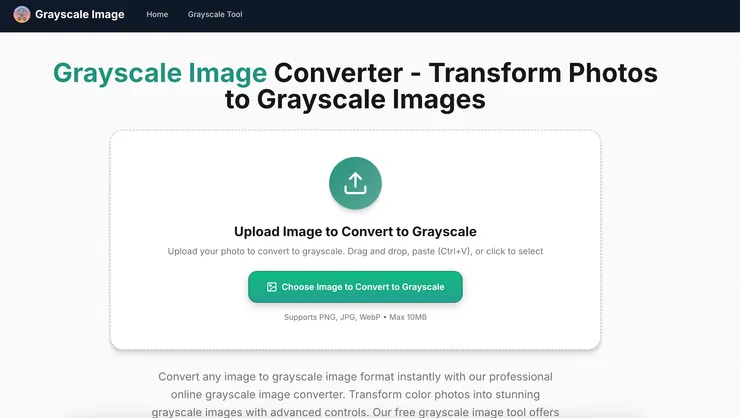
When a shot needs vintage charm—or you just want to simplify color distractions—Grayscale Image does the job faster than firing up Photoshop. Drag a file onto the page, hit Grayscale, and download the result. A tone slider lets you fine‑tune brightness, and the converter accepts far more than the usual web formats, including TIFF, SVG, and EPS.

Best use cases

  • Social media nostalgia: black‑and‑white feeds routinely attract higher engagement.
  • Print proofs & algorithm prep: grayscale simplifies edge detection and lowers ink costs.
  • File‑size trimming: reducing to 8‑bit grayscale can slash storage for large archives.

Final Thoughts

  • Image Inverter turns color on its head for creative negatives and exposure checks.
  • Circle Crop Image delivers perfect circular avatars with transparent backgrounds in seconds.
  • Grayscale Image strips pictures to timeless monochrome for retro flair and practical preprocessing.

Add these three bookmarks to your design toolkit and you’ll be ready for the most common quick‑fix edits—no heavyweight software (or credit card) required.

留言
avatar-img
indiehacker的沙龍
0會員
14內容數
indiehacker的沙龍的其他內容
2025/07/07
Discover how AI-powered Remove Text from Image tool helps you effortlessly remove watermarks, text overlays, and unwanted elements from photos easily.
2025/07/07
Discover how AI-powered Remove Text from Image tool helps you effortlessly remove watermarks, text overlays, and unwanted elements from photos easily.
2025/05/20
The bold, bratty visual language of Charli XCX’s BRAT era has taken over the internet—neon green backgrounds, minimalist fonts, and all-caps attitud
Thumbnail
2025/05/20
The bold, bratty visual language of Charli XCX’s BRAT era has taken over the internet—neon green backgrounds, minimalist fonts, and all-caps attitud
Thumbnail
2025/05/09
There was a time when computers didn’t just beep—they talked. And not with human-like voices, but with quirky, robotic tones that quickly became iconi
Thumbnail
2025/05/09
There was a time when computers didn’t just beep—they talked. And not with human-like voices, but with quirky, robotic tones that quickly became iconi
Thumbnail
看更多
你可能也想看
Thumbnail
5 月將於臺北表演藝術中心映演的「2026 北藝嚴選」《海妲・蓋柏樂》,由臺灣劇團「晃晃跨幅町」製作,本文將以從舞台符號、聲音與表演調度切入,討論海妲・蓋柏樂在父權社會結構下的困境,並結合榮格心理學與馮.法蘭茲對「阿尼姆斯」與「永恆少年」原型的分析,理解女人何以走向精神性的操控、毀滅與死亡。
Thumbnail
5 月將於臺北表演藝術中心映演的「2026 北藝嚴選」《海妲・蓋柏樂》,由臺灣劇團「晃晃跨幅町」製作,本文將以從舞台符號、聲音與表演調度切入,討論海妲・蓋柏樂在父權社會結構下的困境,並結合榮格心理學與馮.法蘭茲對「阿尼姆斯」與「永恆少年」原型的分析,理解女人何以走向精神性的操控、毀滅與死亡。
Thumbnail
本文分析導演巴里・柯斯基(Barrie Kosky)如何運用極簡的舞臺配置,將布萊希特(Bertolt Brecht)的「疏離效果」轉化為視覺奇觀與黑色幽默,探討《三便士歌劇》在當代劇場中的新詮釋,並藉由舞臺、燈光、服裝、音樂等多方面,分析該作如何在保留批判核心的同時,觸及觀眾的觀看位置與人性幽微。
Thumbnail
本文分析導演巴里・柯斯基(Barrie Kosky)如何運用極簡的舞臺配置,將布萊希特(Bertolt Brecht)的「疏離效果」轉化為視覺奇觀與黑色幽默,探討《三便士歌劇》在當代劇場中的新詮釋,並藉由舞臺、燈光、服裝、音樂等多方面,分析該作如何在保留批判核心的同時,觸及觀眾的觀看位置與人性幽微。
Thumbnail
這是一場修復文化與重建精神的儀式,觀眾不需要完全看懂《遊林驚夢:巧遇Hagay》,但你能感受心與土地團聚的渴望,也不急著在此處釐清或定義什麼,但你的在場感受,就是一條線索,關於如何找著自己的路徑、自己的聲音。
Thumbnail
這是一場修復文化與重建精神的儀式,觀眾不需要完全看懂《遊林驚夢:巧遇Hagay》,但你能感受心與土地團聚的渴望,也不急著在此處釐清或定義什麼,但你的在場感受,就是一條線索,關於如何找著自己的路徑、自己的聲音。
Thumbnail
《轉轉生》(Re:INCARNATION)為奈及利亞編舞家庫德斯.奧尼奎庫與 Q 舞團創作的當代舞蹈作品,結合拉各斯街頭節奏、Afrobeat/Afrobeats、以及約魯巴宇宙觀的非線性時間,建構出關於輪迴的「誕生—死亡—重生」儀式結構。本文將從約魯巴哲學概念出發,解析其去殖民的身體政治。
Thumbnail
《轉轉生》(Re:INCARNATION)為奈及利亞編舞家庫德斯.奧尼奎庫與 Q 舞團創作的當代舞蹈作品,結合拉各斯街頭節奏、Afrobeat/Afrobeats、以及約魯巴宇宙觀的非線性時間,建構出關於輪迴的「誕生—死亡—重生」儀式結構。本文將從約魯巴哲學概念出發,解析其去殖民的身體政治。
Thumbnail
將兩個JPG文件合併為一個是一項實用的技能,可用於創建拼貼、文件或演示文稿。本文探討了多種有效的方法來達成這一目標,包括使用在線工具、桌面應用程序以及操作系統內建的工具。每種方法都有其優缺點,適用於不同的需求和資源。無論您是尋求快速解決方案,還是需要高級編輯功能,這份指南將幫助您找到適合的選項。
Thumbnail
將兩個JPG文件合併為一個是一項實用的技能,可用於創建拼貼、文件或演示文稿。本文探討了多種有效的方法來達成這一目標,包括使用在線工具、桌面應用程序以及操作系統內建的工具。每種方法都有其優缺點,適用於不同的需求和資源。無論您是尋求快速解決方案,還是需要高級編輯功能,這份指南將幫助您找到適合的選項。
Thumbnail
網址:https://gadget.chienwen.net/x/text/articlecut 這個網頁裡面有許多小工具, 但感覺現在有很多被 AI 取代掉的東西, 推薦大家可以來用看看~
Thumbnail
網址:https://gadget.chienwen.net/x/text/articlecut 這個網頁裡面有許多小工具, 但感覺現在有很多被 AI 取代掉的東西, 推薦大家可以來用看看~
Thumbnail
這篇文章分享了許多好用的設計工具,包括Adobe、Canva和Mirosoft Designer,提供了它們的特色和適用對象。文章還附上了可以直接使用這些工具的連結。
Thumbnail
這篇文章分享了許多好用的設計工具,包括Adobe、Canva和Mirosoft Designer,提供了它們的特色和適用對象。文章還附上了可以直接使用這些工具的連結。
Thumbnail
Pic Smaller(圖小小)是一個開源的線上圖片壓縮工具,支援 JPG、JPEG、PNG、WEBP、GIF、SVG、AVIF 等格式,能夠快速批量處理多張圖片,沒有限制容量與大小,完全免費,介面簡潔且沒有廣告。
Thumbnail
Pic Smaller(圖小小)是一個開源的線上圖片壓縮工具,支援 JPG、JPEG、PNG、WEBP、GIF、SVG、AVIF 等格式,能夠快速批量處理多張圖片,沒有限制容量與大小,完全免費,介面簡潔且沒有廣告。
Thumbnail
今天,捷可印將帶各位讀者來探討 Photopea 這款類似於 Photoshop 的影像處理工具,特別是其智能選取功能,以及如何利用這些工具來改進您的圖片處理工作流程。在圖片處理的世界中,有效的工具不僅提升效率,更能賦予創作者更大的創作自由。 一、Photopea 的選取工具:精確與效率的完美
Thumbnail
今天,捷可印將帶各位讀者來探討 Photopea 這款類似於 Photoshop 的影像處理工具,特別是其智能選取功能,以及如何利用這些工具來改進您的圖片處理工作流程。在圖片處理的世界中,有效的工具不僅提升效率,更能賦予創作者更大的創作自由。 一、Photopea 的選取工具:精確與效率的完美
Thumbnail
ImageColorizer 是一個專門修復老舊照片的線上服務,提供多項 AI 修復功能,包括黑白照片上色、增強畫質改善模糊、人物臉部清晰、修補刮傷破損影像等。開放免費體驗,無需註冊。
Thumbnail
ImageColorizer 是一個專門修復老舊照片的線上服務,提供多項 AI 修復功能,包括黑白照片上色、增強畫質改善模糊、人物臉部清晰、修補刮傷破損影像等。開放免費體驗,無需註冊。
Thumbnail
在內容行銷的世界中,找到適合又稱手的工具是每位行銷專員的快樂泉源之一,畢竟這代表能夠花費更少的時間,擁有更好的效率與產能(然後盡早下班XD)。幸運的是,現在有許多免費的創意工具可以幫助你快速製作引人入勝的視覺內容,從而提高品牌曝光和銷售業績。讓我們一起來看看幾個最受歡迎的平台吧!
Thumbnail
在內容行銷的世界中,找到適合又稱手的工具是每位行銷專員的快樂泉源之一,畢竟這代表能夠花費更少的時間,擁有更好的效率與產能(然後盡早下班XD)。幸運的是,現在有許多免費的創意工具可以幫助你快速製作引人入勝的視覺內容,從而提高品牌曝光和銷售業績。讓我們一起來看看幾個最受歡迎的平台吧!
Thumbnail
Creatie AI 助力UI設計,PixVerse 將圖片動態化。Pigment 提供色彩調整工具,404s 靈感來自眾多404頁面設計。PDF Escape 是 Acrobat 的免費選擇,簡化 PDF 處理。這些工具為設計師提供高效和創新的解決方案。
Thumbnail
Creatie AI 助力UI設計,PixVerse 將圖片動態化。Pigment 提供色彩調整工具,404s 靈感來自眾多404頁面設計。PDF Escape 是 Acrobat 的免費選擇,簡化 PDF 處理。這些工具為設計師提供高效和創新的解決方案。
追蹤感興趣的內容從 Google News 追蹤更多 vocus 的最新精選內容追蹤 Google News