
This article will introduce how to use BERT to get sentence embedding and use this embedding to fine-tune downstream tasks. I will also talk about Sentence Similarity for sentence clustering or intention matching.
I will only go through a few details of BERT in this article since there are already tons of excellent articles and tutorials on the internet talking about it.
OK, that start it!

BERT sentence embedding for downstream task
The concept is to transform the sentence (i.e. sequence of text) into a numerical vector and then come up with a linear layer to do the downstream task (classification or regression)
BERT offers the following 4 down-stream task examples:

To use BERT, you need to prepare the input stuffs for BERT.
- token id: The index of each text in BERT corpus.
- attention mask: Because we will padding every sentence to the same length, it needs attention mask to let self-attention layer know which words are padding words and mask them.
- segment id: If your downstream task need input two sentences (e.g. sentence pair classification, question answering), segment id is used to distinguish first and second sentence. If your task only have one sentence as input, you only need to create a constant array with any index.

Let us create these input tensors step by step then you will be clear on that.
- import package & download tokenizer and model:
import torch
from transformers import BertTokenizer,BertModel

tokenizer = BertTokenizer.from_pretrained('bert-base-uncased')
model = BertModel.from_pretrained("bert-base-uncased")
# models: https://huggingface.co/models?sort=downloads
2. tokenize the sequence
sentence = 'I really enjoyed this movie a lot.'
tokens = tokenizer.tokenize(sentence)
print(tokens)
# ['i', 'really', 'enjoyed', 'this', 'movie', 'a', 'lot', '.']
3. Add [CLS] and [SEP] tokens
tokens = ['[CLS]'] + tokens + ['[SEP]']
tokens
# ['[CLS]', 'i', 'really', 'enjoyed', 'this', 'movie', 'a', 'lot', '.', '[SEP]']
4. Padding the input
T=15

padded_tokens = tokens + ['[PAD]'for_inrange(T-len(tokens))]
print("Padded tokens are \n {} ".format(padded_tokens))

attn_mask = [1iftoken !='[PAD]'else0fortokeninpadded_tokens ]
print("Attention Mask are \n {} ".format(attn_mask))

5. Create a list of segment tokens
seg_ids = [0 for _ in range(len(padded_tokens))]
6. Create input tensor for all of this stuff
sent_ids = tokenizer.convert_tokens_to_ids(padded_tokens)
token_ids = torch.tensor(sent_ids).unsqueeze(0)
attn_mask = torch.tensor(attn_mask).unsqueeze(0)
seg_ids = torch.tensor(seg_ids).unsqueeze(0)

print(token_ids)
print(attn_mask)
print(seg_ids)

# tensor([[ 101, 1045, 2428, 5632, 2023, 3185, 1037, 2843, 1012, 102, 0, 0, 0, 0, 0]])
# tensor([[1, 1, 1, 1, 1, 1, 1, 1, 1, 1, 0, 0, 0, 0, 0]])
# tensor([[0, 0, 0, 0, 0, 0, 0, 0, 0, 0, 0, 0, 0, 0, 0]])
7. model inference
So far, we’ve already prepared the input BERT need, we are ready to feed all this stuffs into model then get the sentence embedding.
output = model(token_ids, attention_mask=attn_mask,token_type_ids=seg_ids)
last_hidden_state, pooler_output = output[0], output[1]

print(last_hidden_state.shape) #hidden states of each token
print(pooler_output.shape) #hidden states of [cls] (forward one linear layer and Tanh activation)
Basically, pooler_output is what we want. We only need to add some linear layer to create output layer for our downstream task to fine-tune the neural network. For example:
from transformers import BertTokenizer,BertModel

class BERT_classifier(nn.Module):
		def __init__(self, bertmodel, num_label):
				super(BERT_classifier, self).__init__()
				self.bertmodel = bertmodel
				self.classifier = nn.Linear(bertmodel.config.hidden_size, num_label)

		def forward(self, wrapped_input):
				hidden = self.bertmodel(**wrapped_input)
				last_hidden_state, pooler_output = hidden[0], hidden[1]
				logits = self.classifier(pooler_output)

				return logits

bert = BertModel.from_pretrained("bert-base-uncased")
model = BERT_classifier(bert, 2)
you also can just use the build in model structure in Huggingface, e.g. BertForSequenceClassification, BertForQuestionAnswering
from transformers import BertForSequenceClassification

model = BertForSequenceClassification.from_pretrained('bert-base-uncased', num_labels=2)
# this has same model structure as above
You might have noticed that it’s very easy to inference with BERT, the main effort is to create the input tensor of BERT.
In the real situation, we don’t need to construct input tensor step by step like in the above described. The tokenizer has already wrapped all this work into a single command.
We can just use the below command to replace the step 2,3,4,5.
wrapped_input = tokenizer(sentence, max_length=15, add_special_tokens=True, truncation=True,
padding='max_length', return_tensors="pt")

wrapped_input
#{'input_ids': tensor([[ 101, 1045, 2428, 5632, 2023, 3185, 1037, 2843, 1012, 102, 0, 0, 0, 0, 0]]),
'token_type_ids': tensor([[0, 0, 0, 0, 0, 0, 0, 0, 0, 0, 0, 0, 0, 0, 0]]),
'attention_mask': tensor([[1, 1, 1, 1, 1, 1, 1, 1, 1, 1, 0, 0, 0, 0, 0]])}
Note: padding=True will padding to the longest setence length, on the other hand, if padding=‘max_length’ then it will padding to the length “max_length”unpack this dict and feed it into the model then we’ll get the embedding
output = model(**wrapped_input)
last_hidden_state, pooler_output = output[0], output[1]
Exercise
I took IMDb movie review as an example (BERTforSequenceClassification). The goal is to classify whether the movie review is positive or negative.
Basically, it’s just PyTorch training pipeline so I’m not going to talk too much in this article. I put jupyter notebook in this github repo you can refer to it.
The val acc ~92.5% and test set acc = 23084 / 25000(92.336%)
[epoch 1]train on 24000 data......
100%|██████████| 1500/1500 [09:24<00:00, 2.66it/s]
training set: average loss: 0.0168, acc: 21350/24000(88.958%)
validation on 1000 data......
Val set:Average loss:0.0120, acc:928/1000(92.800%)
elapse: 575.06s

[epoch 2]train on 24000 data......
100%|██████████| 1500/1500 [09:15<00:00, 2.70it/s]
training set: average loss: 0.0094, acc: 22685/24000(94.521%)
validation on 1000 data......
Val set:Average loss:0.0126, acc:936/1000(93.600%)
elapse: 566.25s

[epoch 3]train on 24000 data......
100%|██████████| 1500/1500 [09:19<00:00, 2.68it/s]
training set: average loss: 0.0054, acc: 23321/24000(97.171%)
validation on 1000 data......
Val set:Average loss:0.0166, acc:925/1000(92.500%)
elapse: 569.87s

[epoch 4]train on 24000 data......
100%|██████████| 1500/1500 [09:18<00:00, 2.69it/s]
training set: average loss: 0.0032, acc: 23621/24000(98.421%)
validation on 1000 data......
Val set:Average loss:0.0196, acc:925/1000(92.500%)
elapse: 568.86s

[epoch 5]train on 24000 data......
100%|██████████| 1500/1500 [09:21<00:00, 2.67it/s]
training set: average loss: 0.0021, acc: 23743/24000(98.929%)
validation on 1000 data......
Val set:Average loss:0.0180, acc:925/1000(92.500%)
elapse: 572.23s
Sentence Similarity
When you are trying to do sentence/doc clustering or intention matching, you will need to do sentence similarity.
You might think about using BERT embedding we got from the above section and then calculate Euclidean distance or cosine similarity between two sentence embeddings. However, it’s not a good solution.
Reminding that BERT pre-train was trained by MaskedLM, NextSentencePrediction, hence the original purpose of BERT is not to create a meaningful embedding of the sentence but for some specific downstream task.
Jacob Devlin’s comment: I’m not sure what these vectors are, since BERT does not generate meaningful sentence vectors. It seems that this is is doing average pooling over the word tokens to get a sentence vector, but we never suggested that this will generate meaningful sentence representations. And even if they are decent representations when fed into a DNN trained for a downstream task, it doesn’t mean that they will be meaningful in terms of cosine distance. (Since cosine distance is a linear space where all dimensions are weighted equally). (https://github.com/google-research/bert/issues/164#issuecomment-441324222)
If you want to use BERT to do sentence similarity, the closest task should be sentence pair classification.
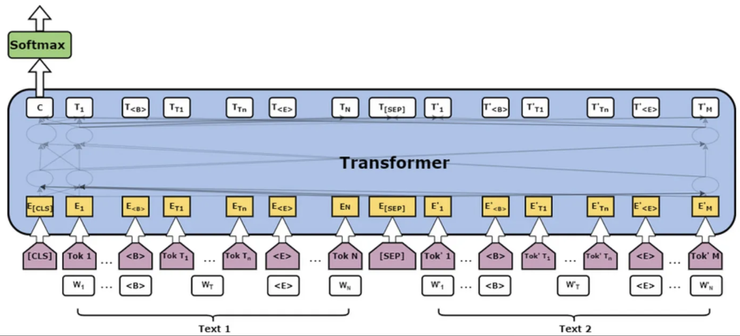
input is two sentences that you want to compare with and the target is whether these two sentences have the same meaning or not.
However, this method is not efficient. Imagine that you have 100 sentences and you want to know the similarity of each pair of sentences, then you need to feedforward BERT C(100, 2) = 4950 times.
The straightforward way is to train a meaningful embedding, then the embedding vector will contain the “meaning” of the sentence. You only need to calculate the similarity of the embedding vector to get the sentence similarity.
Siamese Networks might come to your mind. Feedforward two BERT layers separately, then use Contrastive loss or Triplet loss to train the embedding.
This is a good idea and of course, it has been published in paper and developed into a well-used package.
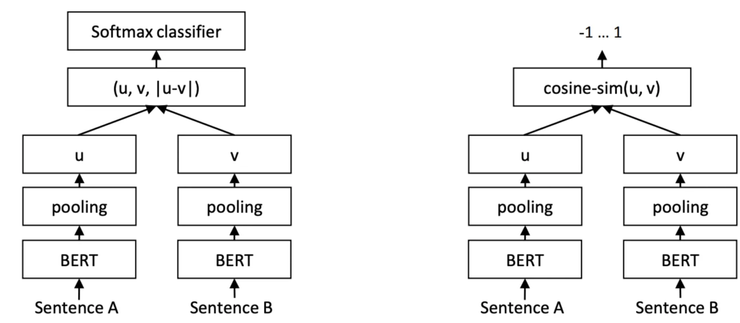
You can refer to Sentence-BERT: Sentence Embeddings using Siamese BERT-Networks. The core idea is just to use BERT to train Siamese Network.
The authors consider three ways in the pooling strategies,: Using the output of the CLS-token, computing the mean of all output vectors (MEANstrategy), and computing a max-over-time of the output vectors (MAX-strategy), and finally choosing MEAN strategy as the default option.
The most important part is that they developed sentence-transformers and it offers the pretrain model which saves you the biggest effort: data collection and labeling!

Exercise
Suppose we are going to develop a chatbot and we need to do intention matching. Let us do a simple experiment.
First, import package and load model.
from sentence_transformers import SentenceTransformer, util

model = SentenceTransformer('paraphrase-multilingual-MiniLM-L12-v2') # multi-language model
sentences = [
		'what is the weather tomorrow',
		'will it rain tomorrow',
		'Will the weather be hot in the future',
		'what time is it',
		'could you help me translate this setence',
		'play some jazz music'
]
use this model to get the embedding of each sentence:
embedding = model.encode(sentences, convert_to_tensor=False)
embedding.shape#(6, 384)
We can see the six sentences have been transformed into 384d embedding vectors.
Then we calculate cosine similarity pairwise and observe the result.
cosine_scores = util.cos_sim(embedding, embedding)
d = {}
for i, v1 in enumerate(sentences):
		for j, v2 in enumerate(sentences):
				if i >= j:
					continue
				d[v1 + ' vs. ' + v2] = cosine_scores[i][j].item()

# sort by score
d_sorted = dict(sorted(d.items(), key=lambda x: x[1], reverse=True))
d_sorted

{'what is the weather tomorrow vs. will it rain tomorrow': 0.8252906203269958,
'what is the weather tomorrow vs. Will the weather be hot in the future': 0.6635355949401855,
'will it rain tomorrow vs. Will the weather be hot in the future': 0.5936063528060913,
'what is the weather tomorrow vs. what time is it': 0.47494661808013916,
'will it rain tomorrow vs. what time is it': 0.4440332055091858,
'Will the weather be hot in the future vs. what time is it': 0.33612486720085144,
'could you help me translate this setence vs. play some jazz music': 0.1588955670595169,
'what is the weather tomorrow vs. play some jazz music': 0.11192889511585236,
'will it rain tomorrow vs. play some jazz music': 0.09996305406093597,
'will it rain tomorrow vs. could you help me translate this setence': 0.09915214776992798,
'what time is it vs. could you help me translate this setence': 0.09021759033203125,
'what is the weather tomorrow vs. could you help me translate this setence': 0.08801298588514328,
'Will the weather be hot in the future vs. could you help me translate this setence': 0.07638849318027496,
'what time is it vs. play some jazz music': 0.054117172956466675,
'Will the weather be hot in the future vs. play some jazz music': 0.027871515601873398}
The score seems to be quite reasonable!


